Understanding Hex to RGB Conversion: The Math Behind Color Codes
A hex to RGB converter turns six-character hexadecimal color codes into the three decimal numbers — red, green, and blue — that screens actually use to mix color. If you've ever pasted #FF5733 from a design file and needed rgb(255, 87, 51)for a CSS animation or JavaScript canvas, you've done this conversion. The math is straightforward base-16 arithmetic, but doing it by hand for dozens of brand colors gets old fast.
What Are Hex Color Codes?
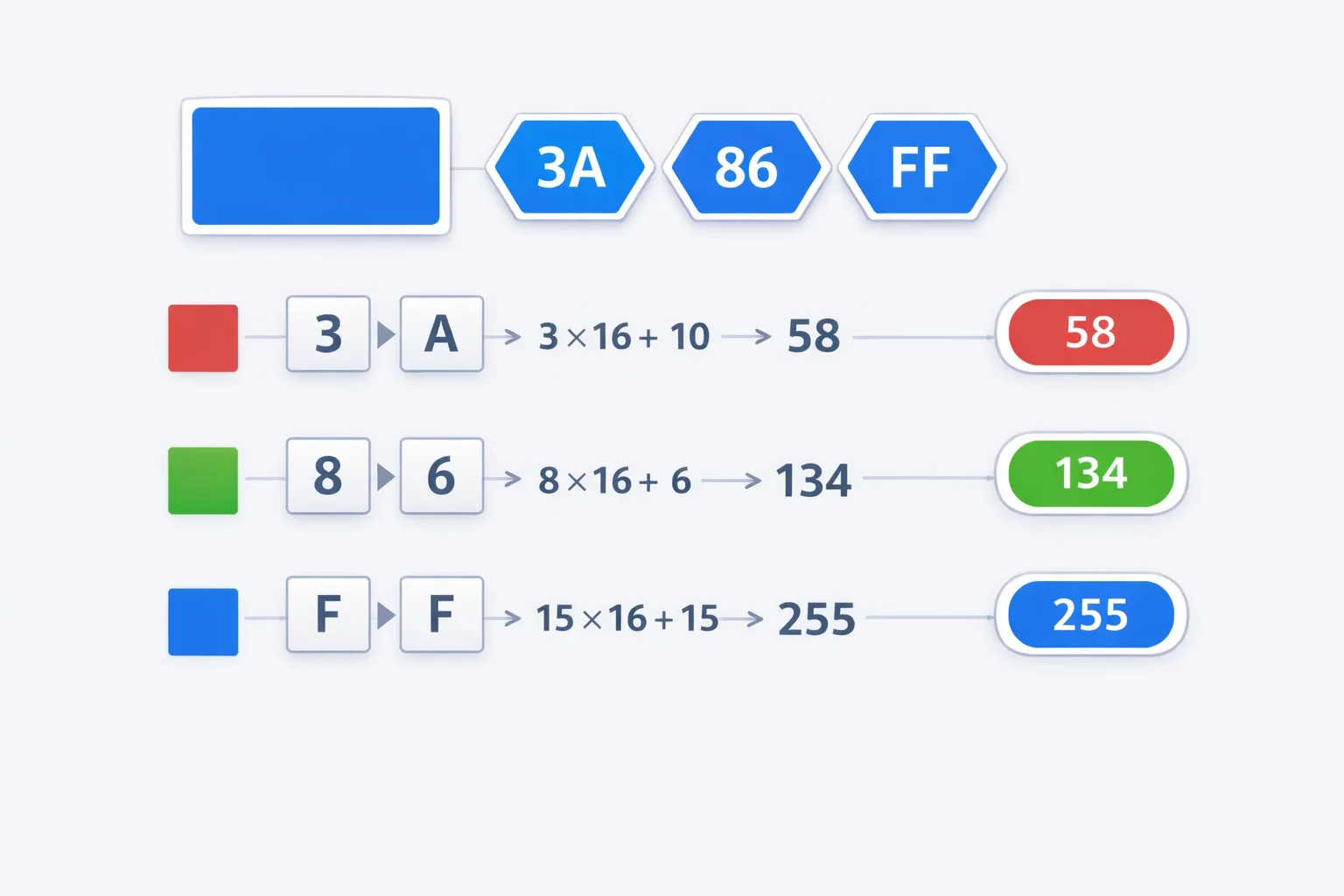
Hex color codes are a way to represent colors using base-16 (hexadecimal) notation. The format is #RRGGBB, where each pair of characters defines the intensity of one color channel: red, green, or blue. Each pair ranges from 00 (zero intensity) to FF (maximum intensity, which is 255 in decimal).
The system dates back to early HTML in the mid-1990s. Netscape Navigator needed a compact way to specify millions of colors in markup, and hex notation fit the bill — just 7 characters (including the #) to encode any of 16,777,216 possible colors. That's 256 × 256 × 256, one byte per channel. The format stuck, and every browser, design tool, and color picker on the planet still speaks hex.
Base-16 to Decimal: The Actual Math
Each hex pair is a two-digit base-16 number. The first digit represents the "sixteens" place, the second represents the "ones" place. The formula for each channel:
Decimal = (first digit × 16) + second digit
The hex digits map to decimal like this: 0-9 stay the same, then A=10, B=11, C=12, D=13, E=14, F=15. So FF = (15 × 16) + 15 = 255. And 3A= (3 × 16) + 10 = 58. That's it — no complex algorithm, just positional notation in a different base.
Here's a quick mapping for the hex digits that trip people up most:
| Hex Digit | Decimal Value | Hex Digit | Decimal Value |
|---|---|---|---|
| 0 | 0 | 8 | 8 |
| 1 | 1 | 9 | 9 |
| 2 | 2 | A | 10 |
| 3 | 3 | B | 11 |
| 4 | 4 | C | 12 |
| 5 | 5 | D | 13 |
| 6 | 6 | E | 14 |
| 7 | 7 | F | 15 |
Three Worked Examples, Step by Step
Example 1: #FF5733 (a warm burnt orange)
- Red: FF → (15 × 16) + 15 = 255
- Green: 57 → (5 × 16) + 7 = 87
- Blue: 33 → (3 × 16) + 3 = 51
- Result:
rgb(255, 87, 51)
Example 2: #2563EB (a clean blue, similar to Tailwind's blue-600)
- Red: 25 → (2 × 16) + 5 = 37
- Green: 63 → (6 × 16) + 3 = 99
- Blue: EB → (14 × 16) + 11 = 235
- Result:
rgb(37, 99, 235)
Example 3: #1A1A2E (a dark navy)
- Red: 1A → (1 × 16) + 10 = 26
- Green: 1A → (1 × 16) + 10 = 26
- Blue: 2E → (2 × 16) + 14 = 46
- Result:
rgb(26, 26, 46)
Notice how the third example has equal red and green channels with slightly more blue — that's what gives it the cool navy undertone rather than a neutral dark gray.
Shorthand Hex and 8-Digit Alpha Codes
CSS supports a 3-digit shorthand: #F53 expands to #FF5533. Each digit gets doubled. This only works when each pair would consist of repeated characters — you can't shorten #FF5733 to 3 digits because 57 and 33aren't double-digit pairs.
Then there's the 8-digit format: #FF573380. The last two characters (80) encode the alpha (opacity) channel. 80 in hex = 128 in decimal = about 50% opacity. Full opacity is FF (255), full transparency is 00 (0). CSS also accepts a 4-digit shorthand: #F538 expands to #FF553388.
Browser support for 8-digit hex is excellent — every modern browser handles it. But if you're supporting IE11 (and some projects still do), you'll need the rgba() function instead. Our hex to RGBA converter handles that translation for you.
Hex vs. RGB vs. HSL — When to Use Which
All three formats describe the exact same color space — 16.7 million colors. The difference is readability and convenience for different tasks.
| Format | Best For | Weakness |
|---|---|---|
| Hex (#FF5733) | Compact notation, design handoffs, copying from Figma/Sketch | Hard to mentally adjust — what's 20% lighter? |
| RGB (255, 87, 51) | JavaScript canvas, image processing, programmatic color math | Three numbers to remember; not intuitive for picking colors |
| HSL (14°, 100%, 60%) | Creating color variations, theming, adjusting brightness/saturation | Less familiar to many developers; CMYK printers don't use it |
A practical rule: use hex in your stylesheets (it's what Figma exports), switch to HSL when building theme variants (just nudge the lightness up or down), and use RGB in JavaScript when you need to manipulate individual channels. Our hex to HSL converter can help with the HSL translation.
Common Mistakes That Break Your Colors
Forgetting case insensitivity. #ff5733 and #FF5733are identical. CSS hex codes are case-insensitive. Some devs waste time "normalizing" case — don't bother unless your style guide requires it for consistency.
Swapping the channel order. Hex is always RGB, never BGR. Some image-processing libraries (looking at you, OpenCV) use BGR ordering internally. If your red looks blue, check the channel order.
Using hex digits above F. #GG0000isn't valid. Hex only goes 0-9 and A-F. Browsers will silently ignore invalid hex values, defaulting to black or the inherited color — a subtle bug that's easy to miss.
Assuming shorthand always works. #123 expands to #112233, not #010203. Each character doubles, it doesn't pad. This matters when converting from RGB values like (1, 2, 3) — the hex is #010203, which has no shorthand form.
The 216 Web-Safe Colors (and Why They Still Matter)
In the late 1990s, most monitors could only display 256 colors. The "web-safe" palette was a set of 216 colors that rendered identically on both Mac and Windows systems. These colors use only the hex values 00, 33, 66, 99, CC, and FF — six options per channel, 6³ = 216 combinations.
Modern screens display millions of colors, so the web-safe constraint is irrelevant for display purposes. But the palette still shows up in two places: email HTML (some email clients have limited color rendering) and as a quick reference for "clean" hex values that are easy to remember. Colors like #333333, #666666, and #CC0000 are web-safe values that stuck around in common usage.
Modern CSS Color Functions Beyond rgb()
CSS has evolved well past rgb(). The modern syntax drops the commas: rgb(255 87 51) works in all current browsers. You can add alpha directly: rgb(255 87 51 / 50%). No separate rgba() function needed anymore.
CSS Color Level 4 introduced even wider gamut options. color(display-p3 1 0.34 0.2) accesses the P3 color space that modern Apple devices and high-end monitors support — roughly 25% more colors than sRGB. The W3C CSS Color Level 4 specification covers the full syntax. Meanwhile, the oklch() and oklab()functions provide perceptually uniform color spaces — meaning "50% lighter" actually looks 50% lighter to the human eye, unlike HSL where lightness is mathematically uniform but visually skewed.
For most projects, hex and rgb() cover everything you need. But if you're building a design system or doing serious color work, oklch() is where the industry is heading.
Pro Tips for Working with Hex Colors
- Memorize the gray scale. Any hex code where all three pairs match is a gray:
#333(dark),#888(medium),#CCC(light),#EEE(very light). Knowing this lets you eyeball any hex code — if the pairs are similar, it's close to gray. - Halve any channel by subtracting ~80 hex.
#FF0000(bright red) becomes roughly#800000(dark red, which is CSS "maroon"). Since 0x80 = 128, you're cutting the channel value in half. - Use browser DevTools. Chrome and Firefox both show a color swatch next to hex values in the Styles panel. Click the swatch to open an inline color picker that converts between hex and RGB on the spot.
- Check contrast, not just aesthetics. A color that looks great on your monitor might fail WCAG 2.1 contrast requirements for text readability. The minimum ratio for normal text is 4.5:1 (AA), and 7:1 for AAA. Always verify.
- Store brand colors in variables, not hex literals. CSS custom properties (
--brand-primary: #2563EB;) or Sass/Tailwind tokens make global color changes a one-line edit instead of a find-and-replace nightmare.