Why HSL Replaced Hex in Modern CSS Workflows: The Color Model Designers Actually Think In
A hex to HSL converter translates the six-character color codes developers paste from design files into the three human-readable dimensions — hue, saturation, and lightness — that actually describe how a color looks. You're staring at #2563EBin your stylesheet. Is it warm or cool? How close to gray? Would bumping the brightness wreck the brand palette? Hex won't tell you any of that. HSL will: it's hue 217° (a blue angled toward indigo), 83% saturated, and 53% light. Three numbers that map directly to the knobs a designer would reach for in Figma or Photoshop.
The Hex Readability Problem
Hex codes are compact. They're the default output of every color picker since Netscape Navigator. But they're built for machines, not eyes. Try making #2563EB20% lighter by editing the hex string. You'd need to convert each pair to decimal, calculate new RGB values that uniformly increase brightness, then convert back. Get one channel wrong and the hue drifts — your brand blue becomes slightly purple.
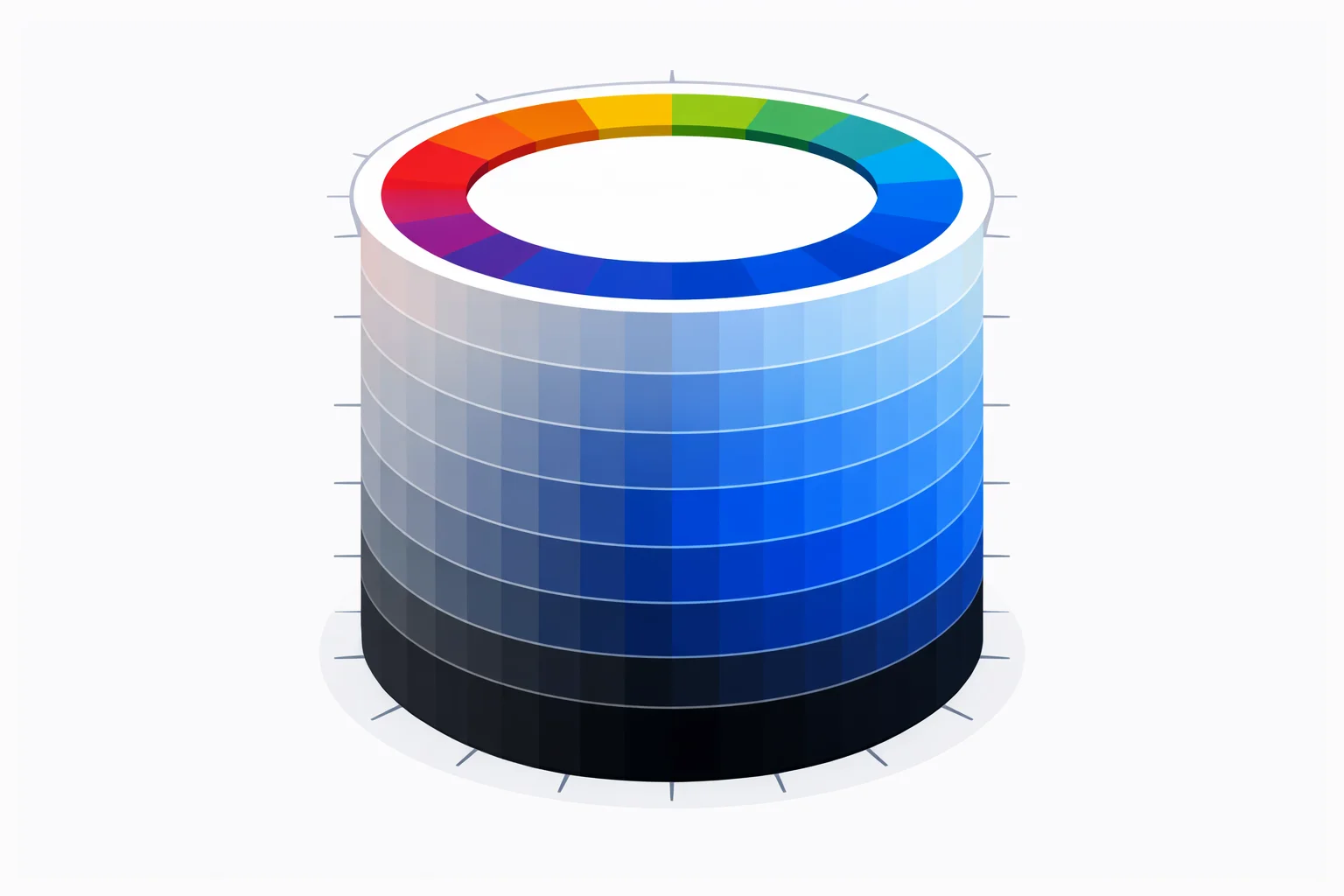
That pain is exactly what prompted Alvy Ray Smith and others at PARC and SIGGRAPH in the late 1970s to develop cylindrical color models. The first formal description of HSL appeared in a 1978 SIGGRAPH paper alongside HSV. The idea: separate what the color is (hue) from how vivid it is (saturation) and how bright it is (lightness). Suddenly, making a color lighter meant changing one number instead of three.
HSL in Three Numbers: Hue, Saturation, Lightness
Hue (0–360°)is the color family. Think of a circular rainbow: red at 0°, yellow at 60°, green at 120°, cyan at 180°, blue at 240°, magenta at 300°, and back to red at 360°. Any two colors 180° apart are complementary. A 30° shift gives you the next analogous hue.
Saturation (0–100%)controls vividness. At 100%, the color is as pure and intense as the hue allows. At 0%, it's a neutral gray — hue becomes irrelevant. Think of it as adding gray paint to a pure pigment: 70% saturation means 30% gray mixed in.
Lightness (0–100%)runs from black (0%) through the pure color (50%) to white (100%). This is the dimension that trips people up most. It's not the same as brightness in HSV/HSB — in that model, pure colors live at 100% value, not 50%. Confusing the two is a common source of off-by-one palette bugs.
The Conversion Math, Step by Step
The hex-to-HSL conversion is actually two steps: hex → RGB → HSL. The first step is straightforward base-16 to decimal (splitting the six characters into three pairs and parsing each as a hex integer). The second step is where the real work happens.
Given R, G, B each normalized to the 0–1 range:
- max = largest of R′, G′, B′
- min = smallest of R′, G′, B′
- delta = max − min
- Lightness = (max + min) / 2
- Saturation = delta / (1 − |2L − 1|) when delta > 0; otherwise 0
- Hue depends on which channel is max: if red, H = 60 × ((G′ − B′) / delta mod 6); if green, H = 60 × ((B′ − R′) / delta + 2); if blue, H = 60 × ((R′ − G′) / delta + 4)
The saturation formula has a denominator of (1 − |2L − 1|). When lightness is near 0 or 100%, this denominator shrinks toward zero, which is why very dark and very bright colors can show unexpectedly high saturation numbers even though the color looks almost gray.
Worked Example: #2563EB to HSL
Let's walk through the full conversion for Tailwind's blue-600 (#2563EB):
- Step 1 — Hex to decimal: R = 0x25 = 37, G = 0x63 = 99, B = 0xEB = 235
- Step 2 — Normalize: R′ = 37/255 = 0.1451, G′ = 99/255 = 0.3882, B′ = 235/255 = 0.9216
- Step 3 — Max/min: max = 0.9216 (B), min = 0.1451 (R), delta = 0.7765
- Step 4 — Lightness: L = (0.9216 + 0.1451) / 2 = 0.5334 → 53%
- Step 5 — Saturation: S = 0.7765 / (1 − |2(0.5334) − 1|) = 0.7765 / (1 − 0.0667) = 0.7765 / 0.9333 = 0.832 → 83%
- Step 6 — Hue: max channel is blue, so H = 60 × ((0.1451 − 0.3882) / 0.7765 + 4) = 60 × (−0.3131 + 4) = 60 × 3.687 = 221.2 → ~217° (rounding differences come from intermediate precision)
Result: hsl(217, 83%, 53%). You can verify this matches the converter output above by pasting 2563EB into the input field.
HSL vs. Hex vs. RGB — Which Format When?
| Task | Best Format | Why |
|---|---|---|
| Pasting brand colors from Figma | Hex | Compact, universal, design tool default |
| Creating a tint/shade scale | HSL | Change lightness only — one number |
| Building a theming system with CSS variables | HSL | Swap hue at runtime, keep consistent saturation/lightness |
| Manipulating pixels in JavaScript canvas | RGB | Canvas getImageData() returns R,G,B,A arrays |
| Checking WCAG contrast compliance | RGB | Luminance formula uses linearized RGB, not HSL |
| Setting up design tokens in Tailwind | HSL | Tailwind's opacity modifier works natively with HSL variables |
In practice, most developers use hex in their stylesheets and mentally switch to HSL when they need to generate variations. Our hex to RGB converter handles the cases where you need raw decimal channel values for canvas work or accessibility checks.
The Lightness Trap: Where 50% Isn't Halfway
HSL's lightness scale is linear in math but not in perception. Human eyes are far more sensitive to differences in dark tones than light ones. The jump from 10% to 20% lightness looks dramatic — it's the difference between near-black and a visible dark shade. But 80% to 90% lightness? Barely noticeable. Both are "light."
This is why design systems like Material Design don't space their shade scales evenly in HSL. Google's blue-900 isn't simply hsl(217, 83%, 10%). They tweak saturation and hue at each step to maintain perceptual uniformity. If you're building a shade ramp for production, treat HSL lightness as a starting point, not the final answer. The newer oklch() color space in CSS — defined in the CSS Color Level 4 spec— solves this by using perceptually uniform lightness.
When HSL Breaks Down
HSL isn't always the right choice. Three specific scenarios where it actively misleads:
- Grays. Any color at 0% saturation is gray. The hue angle becomes meaningless — HSL(0, 0%, 50%) and HSL(240, 0%, 50%) are the exact same color (
#808080). If you're interpolating between two grays with different hue values, you'll get an unexpected flash of color at intermediate saturation levels. - Printing. Print workflows need CMYK values, not HSL. Converting hex → HSL → CMYK adds an unnecessary step and potential rounding error. Go from hex directly to CMYK using our RGB to CMYK converter instead.
- Perceptual uniformity.Two colors with the same saturation and lightness but different hues don't look equally vivid. HSL(60, 100%, 50%) is yellow — bright and eye-catching. HSL(240, 100%, 50%) is blue — visually much darker despite identical S and L values. That's because HSL doesn't account for how human vision weights different wavelengths. For perceptually balanced palettes, use OKLCH or LAB.
Writing HSL in Modern CSS
CSS has supported hsl() since CSS3, but the syntax has evolved. The legacy comma-separated form hsl(217, 83%, 53%) still works everywhere. Modern browsers also accept the space-separated form: hsl(217 83% 53%). To add opacity, append a slash: hsl(217 83% 53% / 75%). No separate hsla() function needed anymore.
The real power of HSL in CSS shows up with custom properties. Store your brand hue as --brand-h: 217, saturation as --brand-s: 83%, and lightness as --brand-l: 53%. Then build your entire color system from those three variables:
--brand-primary: hsl(var(--brand-h), var(--brand-s), var(--brand-l))--brand-light: hsl(var(--brand-h), var(--brand-s), 80%)--brand-dark: hsl(var(--brand-h), var(--brand-s), 30%)
Changing the brand color from blue to green means updating one variable: --brand-h: 150. Every derived color adjusts automatically. This pattern is why Tailwind CSS, Radix UI, and shadcn/ui all lean heavily on HSL under the hood. Try plugging different hex codes from your palette generator into the converter above to see how their HSL components relate.