RGB to CMYK: Why Screen Colors Change When Printed
Converting RGB to CMYK is the single most common color-space translation in professional print work — and the one most likely to produce a nasty surprise. A designer picks a vivid electric blue on screen (say, RGB 0, 100, 255), approves a proof on a monitor, then opens the box from the print shop and finds a muted, almost navy swatch staring back. That gap isn't a printing mistake. It's physics: screens mix light, printers mix ink, and the two systems don't overlap perfectly.
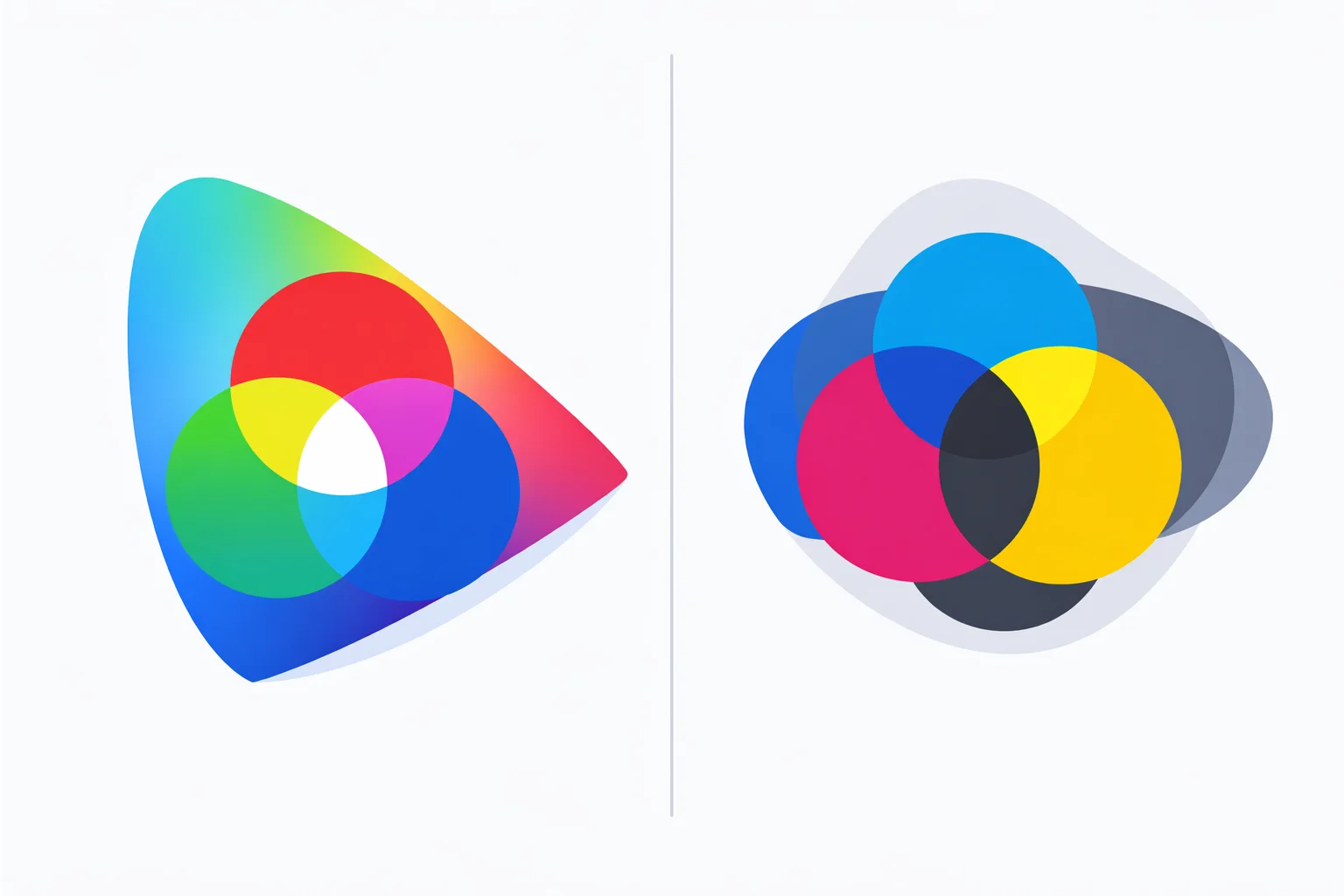
Additive Light vs. Subtractive Ink
Your monitor generates color by adding red, green, and blue light. Crank all three channels to 255 and you get white — the sum of all light. A printer does the opposite: it starts with white paper and subtracts wavelengths by layering cyan, magenta, yellow, and black (Key) inks. Mix C + M + Y at 100% each and you'd theoretically get black, but real-world inks are impure, so the result is a muddy dark brown. That's why printers carry a dedicated black channel — the K in CMYK — saving ink cost and producing crisper text.
The sRGB color space used by most monitors covers roughly 35% of the visible spectrum and can display about 16.7 million distinct colors. The CMYK gamut for coated offset printing covers a smaller, differently-shaped region — roughly 55-70% of sRGB, depending on the paper and ink set. Colors that both spaces share convert cleanly. Colors outside the overlap — typically vivid blues, neon greens, and saturated oranges — get “clipped” to the nearest printable value, which always means a loss of saturation.
The Conversion Math, Step by Step
The standard formula treats CMYK as the mathematical complement of RGB. Here's the full walkthrough for converting RGB(37, 99, 235) — UnitCalcTools' own brand blue.
Step 1 — Normalize.Divide each channel by 255 to get values between 0 and 1. R' = 37 / 255 = 0.1451. G' = 99 / 255 = 0.3882. B' = 235 / 255 = 0.9216.
Step 2 — Find the Key.K = 1 − max(R', G', B') = 1 − 0.9216 = 0.0784. That's about 7.8% black ink — very little, because the color is bright.
Step 3 — Compute C, M, Y. Each ink channel measures how far its corresponding RGB complement falls short of the maximum, scaled by the remaining non-black room:
- C = (1 − 0.1451 − 0.0784) / (1 − 0.0784) = 0.8426 → 84.3%
- M = (1 − 0.3882 − 0.0784) / (1 − 0.0784) = 0.5786 → 57.9%
- Y = (1 − 0.9216 − 0.0784) / (1 − 0.0784) = 0.0000 → 0%
Result: CMYK(84, 58, 0, 8). Total Ink Coverage: 84 + 58 + 0 + 8 = 150% — well within the 300% commercial print limit. The converter above shows this formula live for whatever RGB input you enter, so you can verify each step yourself.
The Gamut Gap: Which RGB Colors Can't Be Printed?
Not all 16.7 million sRGB colors have a CMYK equivalent. The most problematic families, ranked by severity:
- Electric blues (RGB 0-50, 100-200, 220-255) — CMYK inks physically can't reproduce the luminous glow of backlit blue. The printed result shifts toward a darker, grayer blue. A common shock: RGB(0, 0, 255) prints as roughly CMYK(100, 100, 0, 0), which looks more like deep violet than pure blue.
- Neon greens (RGB 0-80, 200-255, 0-100) — pure green light maps to a blend of cyan and yellow inks that skews warmer than the on-screen version.
- Vivid oranges (RGB 255, 100-180, 0-40) — the combination of 100% magenta plus 100% yellow can't match the brightness of an RGB orange lit from behind.
- Hot pinks and magentas (RGB 220-255, 0-40, 130-255) — surprisingly, pure magenta ink (the M channel at 100%) is close to the screen version, but blended pinks lose subtlety.
The safe zone? Pastels, earth tones, muted blues, and anything with a K component above 15% typically convert with little visible difference. If you're designing for print and need accuracy, our color picker tool shows the CMYK output in real time as you drag the selector — stick to colors where the screen and print swatches look nearly identical.
Total Ink Coverage and Why Printers Reject Files
Total Ink Coverage (TIC) — also called Total Area Coverage (TAC) — is the sum of all four ink percentages at a given point. CMYK(100, 80, 0, 20) has a TIC of 200%. Seems abstract until a print house bounces your file with a terse “TIC exceeds 300%” email.
Why the limit? Each layer of ink needs time to dry. Stack too many layers and the paper can't absorb them all — ink bleeds across boundaries, colors smear during cutting, and sheets stick together on the output tray. The safe limits depend on the stock:
| Print Stock | Max TIC | Typical Use |
|---|---|---|
| Coated (gloss/satin) | 320-340% | Brochures, catalogs, packaging |
| Uncoated (matte) | 280-300% | Letterhead, book interiors |
| Newsprint | 240-260% | Newspapers, inserts |
| Web offset (heatset) | 300-320% | Magazines, large-run flyers |
A simple RGB-to-CMYK conversion can easily overshoot. Dark, saturated colors are the worst offenders: a deep brown might come out at C 40% + M 70% + Y 85% + K 60% = 255% — fine for coated stock, but dangerously close for uncoated. Always check TIC after conversion (the tool above flags anything over 300% in red).
Rich Black vs. K-Only Black
RGB(0, 0, 0) converts mathematically to CMYK(0, 0, 0, 100). That's “K-only black” — fine for body text at 9pt, where you need razor-sharp edges and minimal ink spread. But print a K-only black as a full-page background and you'll see a washed-out, slightly warm charcoal instead of the deep, neutral black you expect.
The industry solution is “Rich Black,” which layers ink under the K channel. Common recipes:
- Standard Rich Black: C 60%, M 40%, Y 40%, K 100% = 240% TIC
- Cool Rich Black: C 70%, M 30%, Y 30%, K 100% = 230% TIC (slightly blue undertone)
- Registration Black: C 100%, M 100%, Y 100%, K 100% = 400% TIC — never use this for printing. It exists only as an alignment mark for press setup. Printing it floods the paper with ink and destroys the output.
A pure mathematical RGB-to-CMYK formula won't produce Rich Black — it always outputs K-only. If your design has large black areas, manually override the CMYK values after conversion. The hex to RGB converter can help you start from a hex code if your source color is specified that way.
When NOT to Use a Generic RGB-to-CMYK Formula
The formula above (and the one this converter implements) is a device-independent conversion. It assumes idealized inks and paper. In three situations, you need something more:
- Brand-critical colors. If your client's logo is Coca-Cola red or Tiffany blue, don't convert from RGB. Look up the Pantone spot color (PMS 484 for Coke, PMS 1837 for Tiffany) and use the ink manufacturer's official CMYK fallback values. A generic formula will produce close-but-not-quite results, and “close” is unacceptable for brand identity.
- Photo-quality prints. Photographs contain thousands of subtle color gradations. The generic formula applies the same transform to every pixel, ignoring perceptual uniformity. Adobe Photoshop's “Convert to Profile” (Edit → Convert to Profile → select a CMYK ICC profile like “U.S. Web Coated SWOP v2”) uses a Look-Up Table with 16 million+ pre-calculated corrections. The difference is visible in skin tones, sky gradients, and shadow detail.
- Wide-gamut displays. If you're working on a Display P3 or Adobe RGB monitor, the math changes. Those spaces are larger than sRGB, so the R, G, B values represent a different absolute color than sRGB R, G, B values. Convert to sRGB first (or use an ICC-aware workflow) before applying the CMYK formula — otherwise your printed output will be wrong in ways the side-by-side preview can't show you.
Common RGB-to-CMYK Values at a Glance
This table covers the colors designers look up most often — the ones that trip people up because the CMYK result isn't intuitive. If you need to go the other direction, our RGB to hex converter provides the hex code alongside shorthand detection and CSS output.
| Color | RGB | CMYK | TIC |
|---|---|---|---|
| Pure Red | 255, 0, 0 | 0, 100, 100, 0 | 200% |
| Pure Green | 0, 128, 0 | 100, 0, 100, 50 | 250% |
| Pure Blue | 0, 0, 255 | 100, 100, 0, 0 | 200% |
| White | 255, 255, 255 | 0, 0, 0, 0 | 0% |
| Black | 0, 0, 0 | 0, 0, 0, 100 | 100% |
| Tiffany Blue | 129, 216, 208 | 40, 0, 4, 15 | 59% |
| Cadbury Purple | 118, 35, 148 | 20, 76, 0, 42 | 138% |
| UPS Brown | 100, 56, 19 | 0, 44, 81, 61 | 186% |
Notice how the primaries (pure red, green, blue) all land at exactly 200-250% TIC — safely within commercial limits. The danger zone is dark, saturated composites: a deep chocolate brown or a midnight navy can easily push past 300% once the K channel climbs above 50%.