Hex Color Code Chart: A Complete Reference for Web Colors
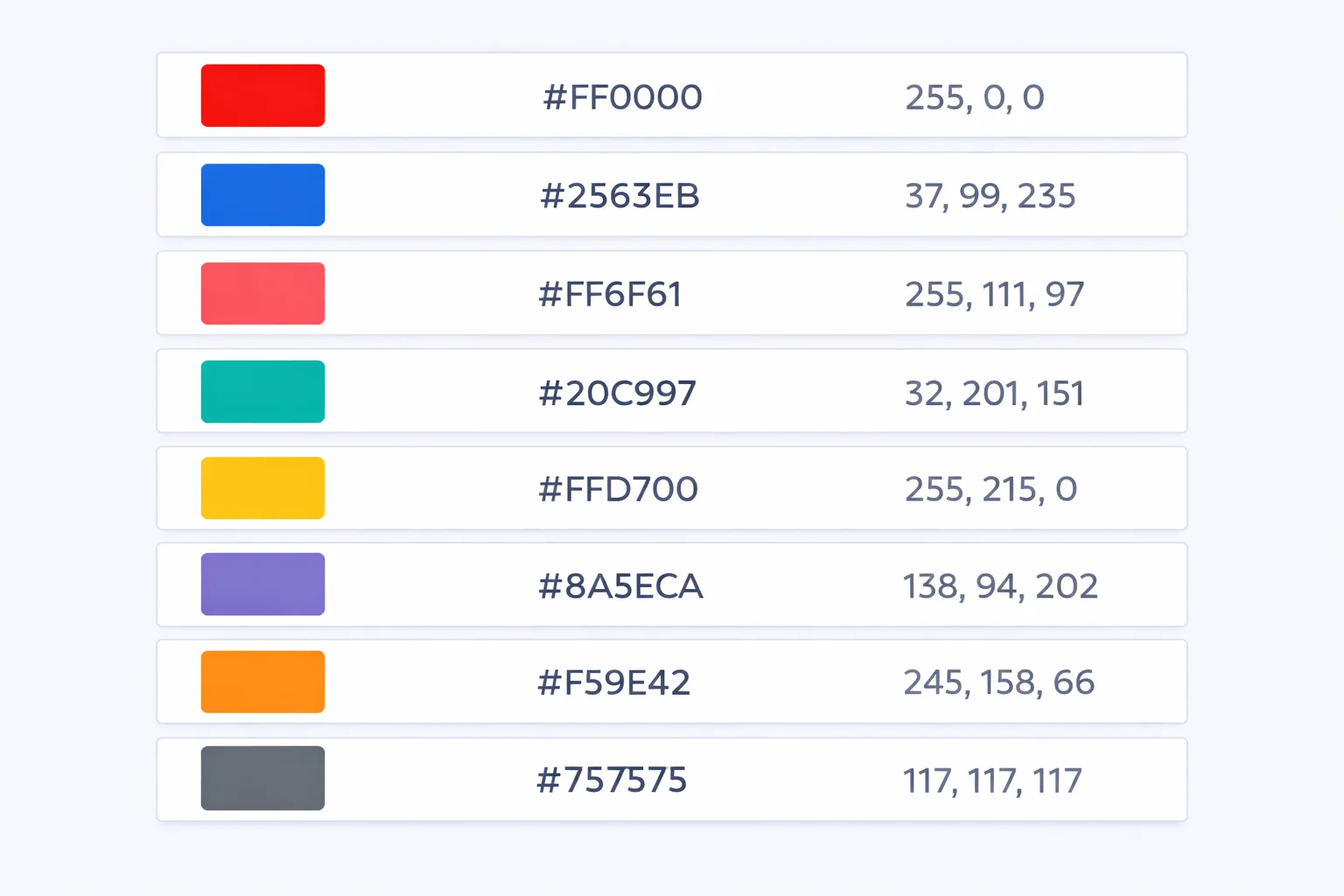
A hex color code chartmaps every CSS named color to its 6-character hexadecimal value — and the full list holds exactly 148 entries, not the 140 you'll see cited on most reference sites. That discrepancy comes from four duplicate pairs (Aqua/Cyan, Fuchsia/Magenta, DarkGray/DarkGrey, and a handful of British spelling variants) that some lists count once and others count twice. The chart above includes every valid keyword a browser will accept, searchable and grouped by hue family.
148 Named Colors and Where They Came From
CSS didn't invent its color names. The list descends from the X11 window system, a graphical framework developed at MIT in 1984. X11 shipped with a file called rgb.txt that mapped human-readable names to RGB triplets so Unix developers could write LightSteelBlue instead of memorizing 176, 196, 222. When HTML 4.01 formalized web standards in 1999, it adopted 17 colors (the 16 VGA colors plus Orange). Then SVG 1.0 in 2001 pulled in 130+ additional X11 names. CSS 2.1 inherited SVG's set, and CSS Color Level 4 added one final entry — rebeccapurple (#663399) — in 2014.
The result is a patchwork. Some names feel intuitive (Red, Gold, Navy). Others are oddly specific — PapayaWhip is #FFEFD5, a warm off-white that has nothing to do with how an actual papaya looks. LemonChiffon (#FFFACD) is closer to cream than lemon. And Peru(#CD853F) was named after the country's desert landscapes, which explains why it's a sandy brown rather than a flag color.
Reading a Hex Code: What Each Digit Pair Means
Every 6-character hex code is three pairs of base-16 digits: the first pair sets red intensity, the second green, the third blue. Each pair ranges from 00 (zero brightness) to FF (maximum brightness, 255 in decimal). So #FF0000 is full red with no green or blue, and #00FF00 is full green. Mix them: #FFFF00 combines full red and full green to produce yellow. If you need a hex to RGB converter to decode specific values, each pair follows the same math: multiply the first digit by 16, then add the second. The digit A equals 10, B is 11, up through F at 15.
Worked example: #2563EB(our site's brand blue). Red channel: 2×16 + 5 = 37. Green: 6×16 + 3 = 99. Blue: E×16 + B = 14×16 + 11 = 235. That's RGB(37, 99, 235) — a vivid medium blue with a dominant blue channel 6.4× stronger than red.
The Gray Naming Trap That Confuses Everyone
Pop quiz: is DarkGray darker than Gray? Nope. It's lighter. This is the single most counter-intuitive thing in the CSS color spec. Here's the actual brightness ordering from darkest to lightest:
| CSS Name | Hex | RGB (all equal) | Lightness |
|---|---|---|---|
| Black | #000000 | 0 | 0% |
| DimGray | #696969 | 105 | 41% |
| Gray | #808080 | 128 | 50% |
| DarkGray ⚠️ | #A9A9A9 | 169 | 66% |
| Silver | #C0C0C0 | 192 | 75% |
| LightGray | #D3D3D3 | 211 | 83% |
| Gainsboro | #DCDCDC | 220 | 86% |
| White | #FFFFFF | 255 | 100% |
DarkGray sits at lightness 66% while plain Gray is at 50%. The X11 system defined "dark" and "light" variants relative to a base color that doesn't match what you'd expect. This has tripped up developers since 1987 — and it's why most design systems (Tailwind, Material, Bootstrap) avoid named CSS colors entirely and use their own numbered gray scales.
The Original 17: HTML 4.01's Color Keywords
Before CSS Color Level 3 pulled in the full X11 set, HTML 4.01 recognized exactly 17 color keywords. These are the only colors guaranteed to work in every browser, email client, and legacy rendering engine:
| Name | Hex | Name | Hex |
|---|---|---|---|
| Black | #000000 | Silver | #C0C0C0 |
| Gray | #808080 | White | #FFFFFF |
| Maroon | #800000 | Red | #FF0000 |
| Purple | #800080 | Fuchsia | #FF00FF |
| Green | #008000 | Lime | #00FF00 |
| Olive | #808000 | Yellow | #FFFF00 |
| Navy | #000080 | Blue | #0000FF |
| Teal | #008080 | Aqua | #00FFFF |
| Orange | #FFA500 (added in CSS 2.1, the 17th keyword) | ||
Notice the pattern: every channel is either 00, 80, or FF. That's by design — the original 16 VGA colors used only these three intensity levels, giving a 3×3×3 = 27 possible combinations. The spec picked 16 of the most useful ones. Orange broke the pattern when it was added later.
Named Colors vs. Raw Hex — When to Use Which
Named colors look clean in code. color: tomato is more readable than color: #FF6347. But there's a practical limit to when they're the right choice.
| Scenario | Best Choice | Why |
|---|---|---|
| Prototyping / quick demos | Named colors | Faster to type, self-documenting, no lookup needed |
| Brand colors in production | Raw hex / CSS variables | Brand guides specify exact hex values — named colors are approximations |
| Design system tokens | HSL or oklch variables | Shade scales need mathematical relationships between values |
| Email HTML templates | Raw hex | Some email clients only support the 17 HTML keywords — extended names may fail |
| Teaching / code examples | Named colors | Students understand red faster than #FF0000 |
The bottom line: named colors are excellent for prototyping, teaching, and throwaway code. For production, use your RGB to hex converter and store exact values in CSS custom properties or design tokens. Named colors can't be adjusted mathematically — you can't lighten tomato by 10% without first converting it to HSL.
Finding the Closest Named Color to Any Hex Value
Got #3A7BDE from a design mockup and want to know the nearest CSS name? You need Euclidean distance in RGB color space. The formula:
distance = √((r₁ - r₂)² + (g₁ - g₂)² + (b₁ - b₂)²)
For #3A7BDE (which is RGB 58, 123, 222), compare against every named color. CornflowerBlue (#6495ED) gives a distance of √((58-100)² + (123-149)² + (222-237)²) = √(1764 + 676 + 225) = √2665 ≈ 51.6. SteelBlue (#4682B4) is closer at √((58-70)² + (123-130)² + (222-180)²) = √(144 + 49 + 1764) = √1957 ≈ 44.2. But DodgerBlue (#1E90FF) wins at distance ≈ 52.3 — wait, actually RoyalBlue (#4169E1) at √((58-65)² + (123-105)² + (222-225)²) = √(49 + 324 + 9) = √382 ≈ 19.5 is the real winner.
This illustrates why you can't eyeball it. Colors that look similar on screen can have very different RGB distances. Our chart above calculates this automatically when you select a color. The theoretical maximum distance between any two sRGB colors is √(255² + 255² + 255²) ≈ 441.7 — the distance from pure black to pure white.
#663399 and the Story Behind RebeccaPurple
The 148th and final named CSS color has an unusual origin. In June 2014, Eric Meyer— a foundational figure in CSS who literally wrote the book on CSS (O'Reilly, 2000) — lost his six-year-old daughter Rebecca to brain cancer. The web development community proposed adding her favorite color to the CSS specification as a tribute.
#663399 was chosen because it matched Rebecca's purple. In RGB terms, that's (102, 51, 153) — a mid-tone violet with red at 40% and blue at 60%. The CSS Color Level 4 specification added it as rebeccapurple(all lowercase, no space). It shipped in Chrome 38, Firefox 33, and Safari 9 within months. It's the only CSS color named after a real person and the only one added since the X11 set was adopted.
How Browsers Actually Render Named Colors
When you write color: coral, the browser doesn't store the word "coral" anywhere in the render pipeline. During CSS parsing, the engine does a case-insensitive lookup against its internal color name table and replaces the keyword with the resolved RGBA value — in Coral's case, rgba(255, 127, 80, 1). From that point forward, the named color is gone. The computed style, the DevTools readout, and the rendering output all use the numeric value.
This matters for performance: named colors add zero runtime cost because resolution happens once during style computation. But it also means getComputedStyle() never returns a named color — it always returns rgb() or rgba(). If you're writing JavaScript that reads colors from the DOM and compares them, compare the RGB values, not strings. Testing === "coral" will always fail. Use our color picker to inspect computed values and see exactly what the browser outputs.
One last quirk: browser DevTools differ in how they display colors. Chrome defaults to hex in the Styles panel, Firefox shows the authored format (name or hex), and Safari uses RGB. You can click the swatch in any browser's DevTools to cycle between formats. None of them affect the actual rendered color — it's purely a display preference.