Degrees to Gradians: Conversion Formula & Why Surveyors Use Gradians
Degrees to gradians conversion is straightforward — multiply by 10/9 — but if you've never encountered gradians before, the natural question is "why does this unit exist?" The short answer: land surveying. Gradians (also called gons) split a full circle into 400 parts instead of 360, which makes right angles a clean 100 and compass quadrants dead simple to work with. This guide covers the formula, the history, real-world applications, and the mistakes that trip people up.
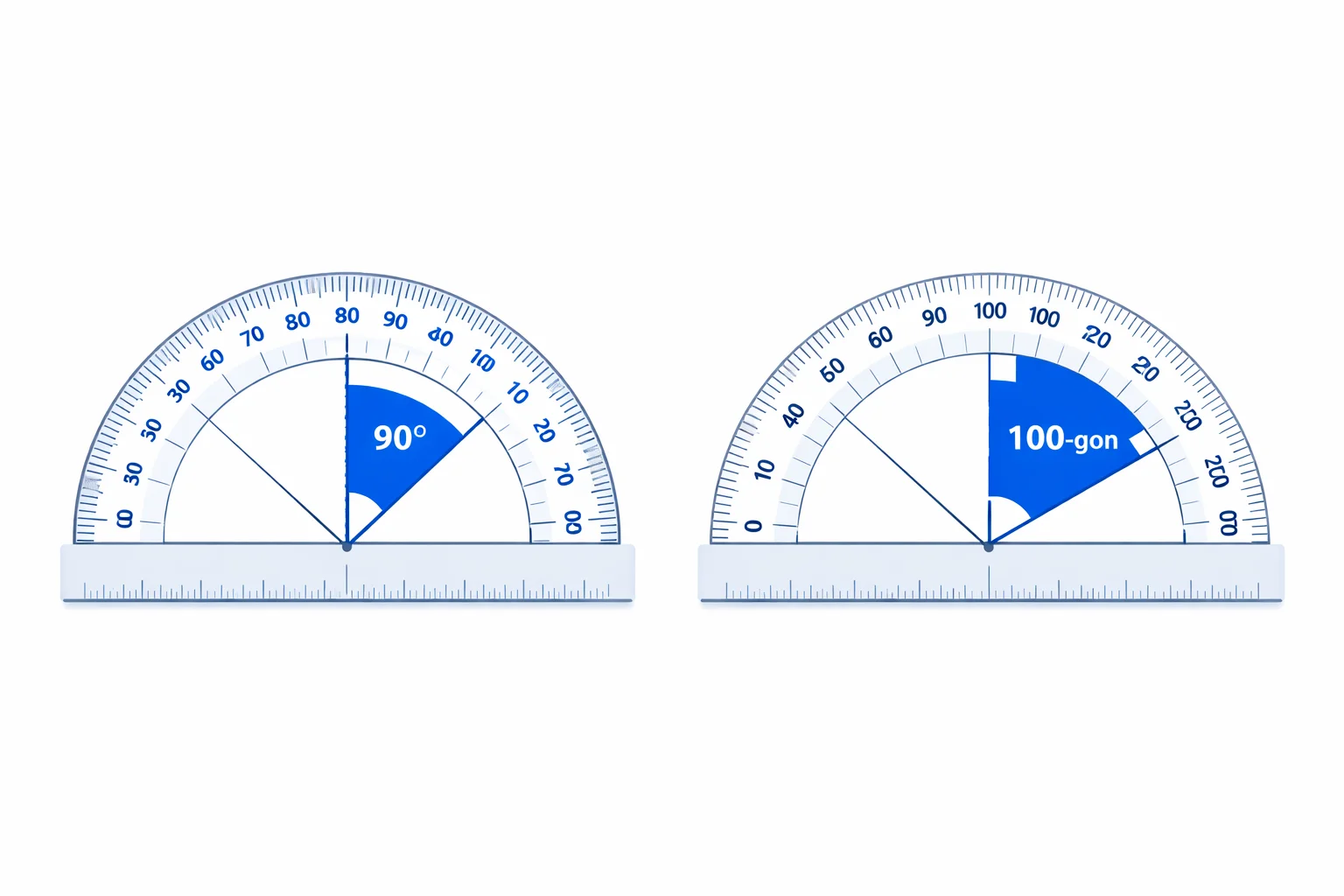
The Degrees-to-Gradians Formula
One line of math handles everything:
gradians = degrees × (10 / 9)
Where does 10/9 come from? A full rotation is 360° and simultaneously 400 gon. Divide 400 by 360 and you get 10/9, or roughly 1.11111. That ratio converts any degree value to gradians. To go the other direction — gradians back to degrees — multiply by 9/10, or use our gradians to degrees converter.
The 10/9 factor is exact and rational. Unlike the degrees-to-radians conversion (which involves the irrational number π), degrees-to-gradians conversions always produce clean decimal results for integer degree inputs — though repeating decimals appear for values that aren't multiples of 9.
What Is a Gradian?
A gradian is 1/400 of a full circle. The unit was created during the French Revolution in the 1790s as part of a broader push to decimalize everything — weights, lengths, currency, and yes, angles. The French Republican government briefly even tried a 10-hour day with 100-minute hours (that one didn't stick).
The gradian survived, though. Its killer feature is that every quadrant boundary falls on a multiple of 100:
- 0 gon — due East (or North, depending on convention)
- 100 gon — North (a right angle from 0)
- 200 gon — due West (straight angle)
- 300 gon — South
- 400 gon — back to 0, full circle
Compare that to degrees (0, 90, 180, 270, 360) — the multiples are clean enough, but as soon as you need to subdivide, gradians win. A 1% grade slope is exactly 1 gon. In degrees, that same slope is 0.9° — manageable, but the gradian version is more intuitive for decimal arithmetic.
Worked Examples Step by Step
The formula is simple, but walking through concrete numbers builds confidence.
Example 1 — 90 degrees: 90 × (10/9) = 900/9 = 100 gon. A right angle. This is the flagship conversion — it's the entire reason surveyors adopted gradians.
Example 2 — 45 degrees: 45 × (10/9) = 450/9 = 50 gon. Half a right angle. In surveying, a 50-gon bearing is a clean diagonal — northeast if you're starting from north.
Example 3 — 180 degrees: 180 × (10/9) = 1800/9 = 200 gon. A straight line. Halfway around the circle.
Example 4 — 1 degree: 1 × (10/9) = 1.1111 gon(repeating). This shows the one quirk — single degrees don't map to clean gon values unless they're divisible by 9.
Example 5 — 270 degrees: 270 × (10/9) = 2700/9 = 300 gon. Three-quarter turn. Pointing straight down on a standard circle.
Example 6 — 15 degrees: 15 × (10/9) = 150/9 ≈ 16.6667 gon. A common subdivision in navigation. Notice the repeating decimal — only multiples of 9° convert to terminating decimals in gradians.
Degrees vs Gradians: Side-by-Side Comparison
Both systems measure the same thing — rotation — but they partition a circle differently. Here's how they stack up:
| Feature | Degrees | Gradians |
|---|---|---|
| Full circle | 360° | 400 gon |
| Right angle | 90° | 100 gon |
| Straight angle | 180° | 200 gon |
| Origin | Babylonian (~2000 BC) | French Revolution (1790s) |
| Primary use | Everyday, navigation, education | Land surveying, some engineering |
| Decimal-friendly | Moderate | Excellent |
| ISO standard name | degree | gon (ISO 31-1) |
The Babylonians chose 360 because it's highly composite — divisible by 2, 3, 4, 5, 6, 8, 9, 10, 12, 15, 18, 20, 24, 30, 36, 40, 45, 60, 72, 90, 120, and 180. The French chose 400 for decimal convenience — each quadrant is exactly 100 units, and percentages of a right angle map directly to gradian values. Both had good reasons. Neither system is objectively "better" — it depends on what you're doing.
Where Gradians Are Actually Used
Outside of surveying, gradians are rare. But inside surveying, they're dominant in several regions:
- European land surveying: France, Germany, Switzerland, and Scandinavian countries use gradians as the primary angle unit for cadastral (property boundary) surveys. A Swiss total station defaults to gon, not degrees.
- Slope and gradient calculations: A 1% slope is exactly 1 gon. Road engineers in metric countries use this fact constantly. In degrees, a 1% slope is 0.5729° — far less intuitive.
- Mining and tunneling:Underground surveys in European mines traditionally use gradians. The 400-gon circle makes bearing calculations easier when you can't see the sky.
- Military (some NATO countries): Certain ISO 31-1 compliant artillery calculations use gon alongside mils.
In the United States, the United Kingdom, and most of Asia, degrees remain the default. If you're working with angles in programming, you'll almost certainly use degrees or radians — check our degrees to radians converter for that path.
Common Mistakes to Avoid
Simple conversion, but people still trip on these:
- Using the wrong factor direction.Degrees to gradians is ×10/9. Gradians to degrees is ×9/10. Mixing them up gives you a value that's off by about 23% — 81 instead of 100, for instance.
- Confusing gradians with radians. They sound similar, but a full circle is 400 gradians vs 6.2832 radians. Entering gradians into a function expecting radians will produce wildly wrong trig results.
- Calculator mode errors.Your scientific calculator has DEG, RAD, and GRAD modes. If sin(100) returns 1, you're in GRAD mode (100 gon = 90°). If it returns 0.9848, you're in DEG mode. If it returns −0.5064, you're in RAD mode. Check the mode indicator before calculating.
- Assuming round-number outputs. Only degree values divisible by 9 produce terminating decimals in gradians. 10° = 11.1111… gon (repeating), not 11.11 gon. Be careful with rounding in precision-sensitive surveying work.
Gradians on Your Calculator
Every scientific calculator sold in the last 30 years supports gradians. Here's how to access the mode on popular models:
- Casio fx-991 series:Press SHIFT → MODE → 2 (for GRAD). The display shows "G" or "GRAD" in the top bar.
- Texas Instruments TI-84:Press MODE → scroll to "DEGREE RADIAN GRADIAN" → select GRADIAN.
- HP 35s / HP Prime: Use the MODES menu or press the angle-mode key to cycle through DEG, RAD, GRAD.
- Windows Calculator:Switch to Scientific mode → click the "GRAD" button near the top-left of the trig section.
- Python: There's no built-in gradian mode, but
math.degrees()and a simple ×10/9 multiplication does the job.
Pro tip: if you're debugging unexpected trig results, the gradian mode is the first thing to rule out. It's the most common accidental mode switch because GRAD sits right next to RAD in most calculator menus.
When You Need This Converter
A few concrete scenarios where degrees-to-gradians conversion is unavoidable:
- Reading European survey data: You receive a French or German land survey in gon and need to verify values against your degree-based maps.
- Setting up a total station: Modern surveying instruments like the Leica FlexLine or Trimble S-series can operate in degrees or gradians. If your project spec requires gon, you need to confirm your reference angles.
- Academic coursework:European geodesy and surveying textbooks use gradians throughout. If your professor gives bearing data in gon and you think in degrees, you'll need to convert constantly.
- Cross-referencing angle systems: When a dataset mixes degrees and gradians (it happens), having a quick converter prevents errors. For radian conversions, try our radians to degrees converter as well.