Decimal Degrees to DMS: How to Convert for GPS Coordinates & Mapping
Converting decimal degrees to DMS is the reverse of what most online tools focus on — yet it's the conversion you actually need when filing a flight plan, writing a property deed, or labeling a nautical chart. Your GPS spits out 40.4461°, but the FAA form wants 40°26′46″N. The math takes three lines of arithmetic, and this guide breaks it down with real coordinates, edge cases, and code you can copy straight into a project.
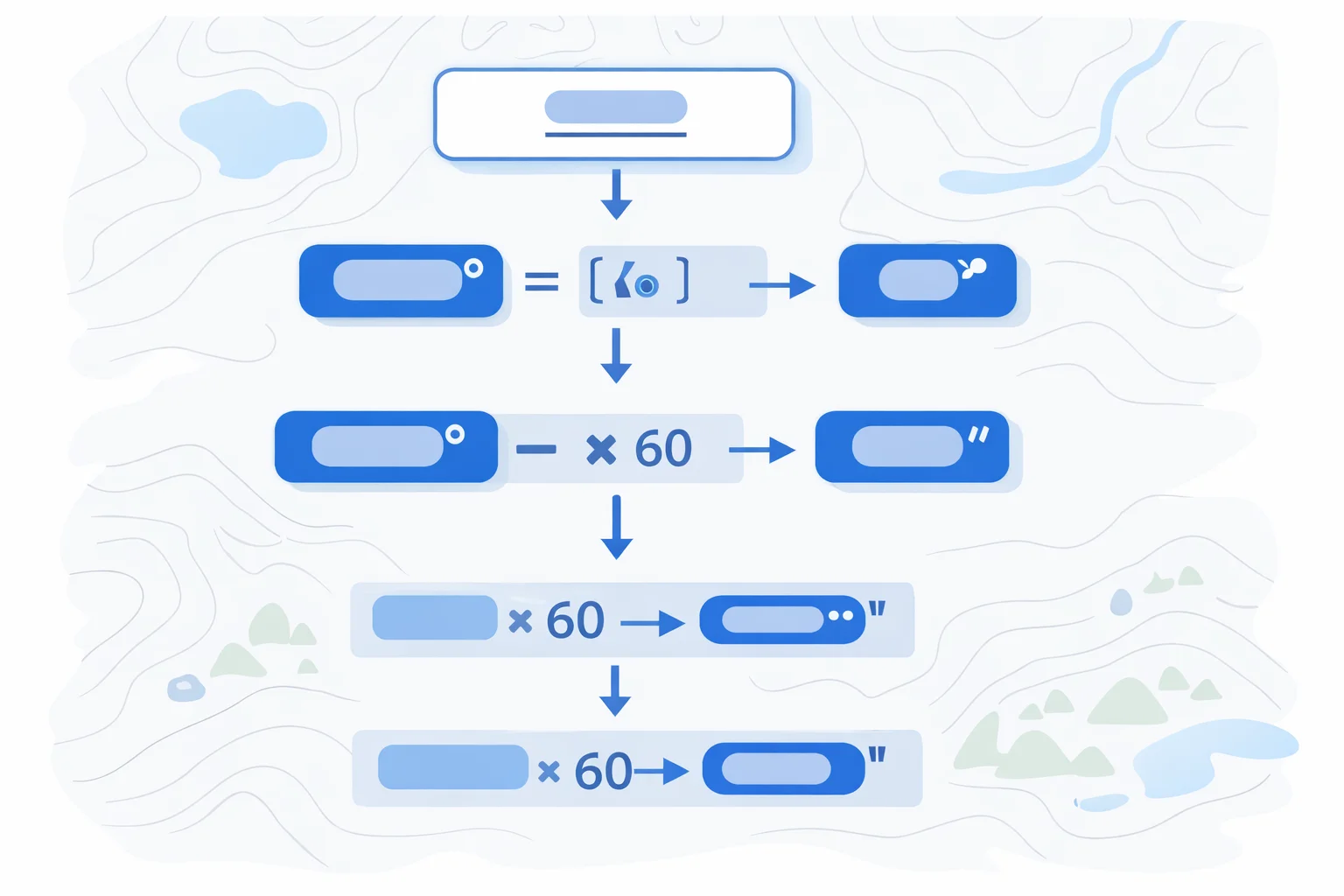
The Decimal to DMS Formula
Start with the absolute value of the decimal degree. The sign gets handled separately as a compass direction.
Degrees = floor(|DD|)
Minutes = floor((|DD| − Degrees) × 60)
Seconds = ((|DD| − Degrees) × 60 − Minutes) × 60
That's it. You're peeling off layers: the integer part is degrees, the first fractional layer (scaled by 60) gives minutes, and the second fractional layer (scaled by 60 again) gives seconds. The total multiplication factor from degrees to seconds is 3,600 — same reason there are 3,600 seconds in an hour.
Once you have the three numbers, attach N or S for latitude (positive = North) and E or W for longitude (positive = East). Never carry the negative sign into the DMS values themselves.
Worked Examples with Real Coordinates
Example 1 — New York City (40.4461°N, −74.0061°W):
- Latitude: floor(40.4461) = 40°. Remainder: 0.4461 × 60 = 26.766. Minutes: 26. Remainder: 0.766 × 60 = 45.96″. Result: 40°26′45.96″N
- Longitude: floor(74.0061) = 74°. Remainder: 0.0061 × 60 = 0.366. Minutes: 0. Remainder: 0.366 × 60 = 21.96″. Result: 74°0′21.96″W
Example 2 — Eiffel Tower (48.8584°N, 2.2945°E):
- Latitude: floor(48.8584) = 48°. 0.8584 × 60 = 51.504. Minutes: 51. 0.504 × 60 = 30.24″. Result: 48°51′30.24″N
- Longitude: floor(2.2945) = 2°. 0.2945 × 60 = 17.67. Minutes: 17. 0.67 × 60 = 40.20″. Result: 2°17′40.20″E
Example 3 — Sydney Opera House (−33.8568°S, 151.2153°E):
- Latitude: floor(33.8568) = 33°. 0.8568 × 60 = 51.408. Minutes: 51. 0.408 × 60 = 24.48″. Result: 33°51′24.48″S (negative input = South)
- Longitude: floor(151.2153) = 151°. 0.2153 × 60 = 12.918. Minutes: 12. 0.918 × 60 = 55.08″. Result: 151°12′55.08″E
Spot-check tip: paste the original decimal coordinates into Google Maps and compare the DMS output shown when you click the pin. If your seconds value is off by more than 0.1″, you've got a rounding issue.
Why DMS Still Matters in 2026
Decimal degrees won the software war decades ago. Every database, GeoJSON spec, and web mapping API stores coordinates as two floating-point numbers. So why convert back to DMS at all?
- Aviation.ICAO flight plan format (field 15) requires coordinates in DMS. A pilot filing IFR can't submit 48.8584° — it must read N4851.5.
- Legal property descriptions.Land deeds in the U.S., UK, and Australia still reference metes-and-bounds in DMS. Title companies won't accept decimal.
- Nautical charts. NOAA and Admiralty charts mark latitude/longitude in DMS with tick marks on the chart border. Marine GPS units display DDM (degrees and decimal minutes), which is a halfway format, but chart plotting requires whole seconds.
- Radio communication.Verbally transmitting "forty degrees, twenty-six minutes, forty-six seconds north" is unambiguous. Saying "forty point four four six one" over a scratchy VHF radio invites transcription errors.
If you're going the other direction — starting with DMS and need decimal — our DMS to decimal degrees converter handles that with the same coordinate presets and copy-paste formats.
Decimal Degree Precision vs. DMS Resolution
A common question: how many decimal places do I need? The answer depends on what physical distance matters for your application:
| DD Decimal Places | DMS Equivalent | Ground Resolution (Equator) |
|---|---|---|
| 1 (e.g. 40.4) | ± 6′ | ~11.1 km (6.9 mi) |
| 2 (e.g. 40.45) | ± 36″ | ~1.1 km (0.69 mi) |
| 3 (e.g. 40.446) | ± 3.6″ | ~111 m (364 ft) |
| 4 (e.g. 40.4461) | ± 0.36″ | ~11.1 m (36 ft) |
| 5 (e.g. 40.44610) | ± 0.036″ | ~1.1 m (3.6 ft) |
| 6 (e.g. 40.446100) | ± 0.0036″ | ~0.11 m (4.3 in) |
Consumer GPS is accurate to 3–5 meters, so 5 decimal places already exceed your hardware's precision. Survey-grade RTK GPS hits centimeter accuracy, justifying 7–8 places. Storing 15 decimal places (float64 full precision) wastes bytes without adding real-world value — you'd be resolving positions down to the diameter of an atom.
Negative Values and Hemisphere Signs
The sign convention is simple but causes more bugs than any other part of coordinate handling:
- Positive latitude = North of the equator (0° to 90°)
- Negative latitude = South of the equator (0° to −90°)
- Positive longitude = East of the Prime Meridian (0° to 180°)
- Negative longitude = West of the Prime Meridian (0° to −180°)
When converting to DMS, strip the sign first and work with the absolute value. The sign only determines whether you append N/S or E/W. A classic bug: applying Math.floor()directly to −33.8568 gives −34, not −33. Always use Math.floor(Math.abs(dd))— floor the absolute value, then reattach the direction letter.
This same hemisphere logic applies when you need to convert degrees to radians for trigonometric functions like the Haversine formula — the sign carries through as-is into radians.
Pitfalls That Cause Wrong Coordinates
These aren't theoretical mistakes. Each one has caused real-world problems in production systems:
- Rounding seconds to 60.If your seconds calculation yields 59.9998, rounding up gives 60″ — which isn't valid. You need to carry: 60 seconds rolls into 1 minute, and 60 minutes rolls into 1 degree. This is the DMS equivalent of a clock rolling from 11:59:59 to 12:00:00.
- GeoJSON longitude-first trap.GeoJSON stores coordinates as [longitude, latitude] — the opposite of every other convention. If you feed GeoJSON values into this converter without swapping, you'll get a latitude of −74° (impossible, since latitude maxes at 90°) and a longitude of 40°. Always check which field is which.
- Using integer division on seconds.Seconds should retain decimal places for precision. Truncating 45.96″ to 45″ loses about 30 meters of accuracy at the equator. Only round when your application explicitly doesn't need sub-second precision.
- Confusing arc-minutes with decimal minutes.DDM format (used by marine GPS) writes 40°26.766′N — that's 26.766 decimalminutes, not 26 minutes and 766 seconds. If your input is DDM, don't try to extract seconds from it without converting the fractional minutes properly.
Implementing DD-to-DMS in Code
Here's a clean JavaScript implementation that handles the hemisphere sign and the 60-second rollover edge case:
function ddToDms(dd, isLat) {
  const dir = isLat
    ? (dd >= 0 ? 'N' : 'S')
    : (dd >= 0 ? 'E' : 'W');
  const abs = Math.abs(dd);
  let deg = Math.floor(abs);
  let min = Math.floor((abs - deg) * 60);
  let sec = ((abs - deg) * 60 - min) * 60;

  // Handle 60-second rollover
  if (sec >= 59.9995) {
    sec = 0;
    min += 1;
    if (min >= 60) {
      min = 0;
      deg += 1;
    }
  }

  return `${deg}°${min}'${sec.toFixed(2)}"${dir}`;
}
The rollover guard at 59.9995prevents displaying 59.9999″ due to floating-point imprecision. In Python, the same approach works with math.floor() and f-strings. For applications that also need radians, pipe the original DD value through our radians to degrees converter to cross-check your math.
One nuance for databases: PostGIS stores everything as float8 internally but has a ST_AsLatLonText()function that outputs DMS directly. If you're building a report that needs DMS labels on a PostGIS-backed map, use the built-in function rather than converting client-side — it handles edge cases and localization for you.
Quick Decimal-to-DMS Reference Chart
Memorize these fractional-degree equivalents and you can estimate DMS in your head:
| Decimal Degrees | DMS | Quick Mental Model |
|---|---|---|
| 0.1° | 0°6′0″ | Tenths = 6 min |
| 0.25° | 0°15′0″ | Quarter = 15 min |
| 0.5° | 0°30′0″ | Half = 30 min |
| 0.75° | 0°45′0″ | Three-quarters = 45 min |
| 0.01° | 0°0′36″ | Hundredths = 36 sec |
| 0.001° | 0°0′3.6″ | Thousandths = 3.6 sec |
| 1.0° | 1°0′0″ | Whole degree = 60 min = 3600 sec |
Quick mental shortcut: multiply the fractional part by 60 to estimate minutes. If you see 0.4461°, think "0.45 × 60 ≈ 27 minutes" — close to the exact 26′46″. Good enough for sanity-checking before you rely on a more precise calculation.
For applications where you need angle measurements in SI units (radians), remember that 1° = π/180 ≈ 0.01745 radians. The DMS → DD → radians pipeline is the standard approach in geodetic software like PROJ.